7 Best DDR5 RAM Kits for Desktop PCs in 2026
The Corsair Vengeance DDR5 32GB (2x16GB) 6000MHz CL30 kit is the best all-round pick for most builders: a common capacity, a speed and latency pairing that suits current AMD and Intel platforms, and broad board support. For a lower price with similar capacity, the Crucial Pro DDR5 32GB 5600MHz kit is a solid choice. If you want maximum capacity for content work or virtual machines, the Corsair Vengeance DDR5 64GB (2x32GB) 5600MHz kit is the pick.
 By Shihab Mia · Published 22 Nov 2026
We run no ads and no affiliate links at launch. The order of a list follows our published method. How lists are ordered: how we score.
Prices are the starting prices vendors list publicly. Plans change, so confirm the current price on the vendor page before you buy.
Key takeaways
- 32GB (2x16GB) is the practical default for gaming and general desktop use; 64GB kits suit heavy multitasking and content work.
- DDR5-6000 CL30 is a common sweet spot for current AMD AM5 boards; Intel boards often run higher speeds more easily.
- Two sticks are easier on the memory controller than four, so 2x16GB or 2x32GB kits are safer than filling all four slots.
- EXPO and XMP profiles must be enabled in BIOS to reach the rated speed; otherwise kits run at a slower default.
- Tall heat spreaders can collide with large air coolers, so check clearance before buying.
Side-by-side
Grouped by fit and cost. Tap a product to jump to its full entry.
| Fit | Cost | |||
|---|---|---|---|---|
| Product | Best for | Standout feature | Listed starting price | Free plan or trial |
| 1Corsair Vengeance DDR5 32GB 6000MHz CL30 | Most gaming and general desktop builds | Common 32GB capacity in a two-stick kit | Check current retail price (2x16GB kit) | One-time hardware purchase |
| 2G.Skill Trident Z5 Neo RGB 32GB 6000MHz CL30 | AMD AM5 builds that want RGB lighting | Tuned for AMD EXPO | Check current retail price (2x16GB kit) | One-time hardware purchase |
| 3Kingston Fury Beast DDR5 32GB 5600MHz | Budget builds and plug-and-play reliability | Lower price tier than 6000MHz kits | Check current retail price (2x16GB kit) | One-time hardware purchase |
| 4Crucial Pro DDR5 32GB 5600MHz | Value builds that need low-profile modules | Low-profile heat spreader | Check current retail price (2x16GB kit) | One-time hardware purchase |
| 5TeamGroup T-Force Vulcan DDR5 32GB 6000MHz | Low-profile builds that still want 6000MHz | 6000MHz rating in a low-profile package | Check current retail price (2x16GB kit) | One-time hardware purchase |
| 6G.Skill Flare X5 32GB 6000MHz CL30 | AMD builds that skip RGB | EXPO-tuned for AM5 | Check current retail price (2x16GB kit) | One-time hardware purchase |
| 7Corsair Vengeance DDR5 64GB 5600MHz | Content work, virtual machines and heavy multitasking | 64GB in two modules | Check current retail price (2x32GB kit) | One-time hardware purchase |
How we picked
This guide is based on research, not lab testing. We read vendor product pages, spec sheets and warranty terms for each kit, and cross-checked rated speeds, latencies, capacities and profile support (EXPO and XMP) against published documentation. We grouped kits by typical use: mainstream gaming, AMD-specific builds, low-profile builds and high-capacity work. Prices are left as "check current retail price" because DDR5 pricing moves frequently. No benchmark results or hands-on measurements are claimed here.
The 7 picks in detail
- Best for
- Most gaming and general desktop builds
- Standout
- Common 32GB capacity in a two-stick kit
- Starting price
- Check current retail price (2x16GB kit)
- Free plan or trial
- One-time hardware purchase
This is a two-module kit of 16GB DIMMs rated at 6000MHz with CL30 timings. Corsair lists support for Intel XMP 3.0 and AMD EXPO profiles, so the same kit can be tuned on either platform. The heat spreader is relatively low, which reduces the chance of a clash with a large tower air cooler.
It suits a mid-to-high gaming build or a general desktop where 32GB covers games, browsers and light creative work. The main catch is that the rated speed is a profile, not a default: without enabling EXPO or XMP in the BIOS, the kit runs at a slower JEDEC speed. Corsair backs Vengeance memory with a limited lifetime warranty.
Where the price comes from
Check current retail price (2x16GB kit). Hardware prices move often, so check the Corsair Vengeance DDR5 32GB 6000MHz CL30 maker page or a retailer before you buy.
Benefits
- Common 32GB capacity in a two-stick kit
- 6000MHz CL30 profile suits AM5 boards
- low-profile heat spreader helps cooler clearance
Drawbacks
- No RGB on the standard version
- rated speed needs EXPO or XMP enabled
Use case to skip: this limit matters to you: no RGB on the standard version.
Our take. A sensible pick for most gaming and general desktop builds.
If it does not fit, compare G.Skill Trident Z5 Neo RGB 32GB 6000MHz CL30 or Kingston Fury Beast DDR5 32GB 5600MHz in this list.
- Best for
- AMD AM5 builds that want RGB lighting
- Standout
- Tuned for AMD EXPO
- Starting price
- Check current retail price (2x16GB kit)
- Free plan or trial
- One-time hardware purchase
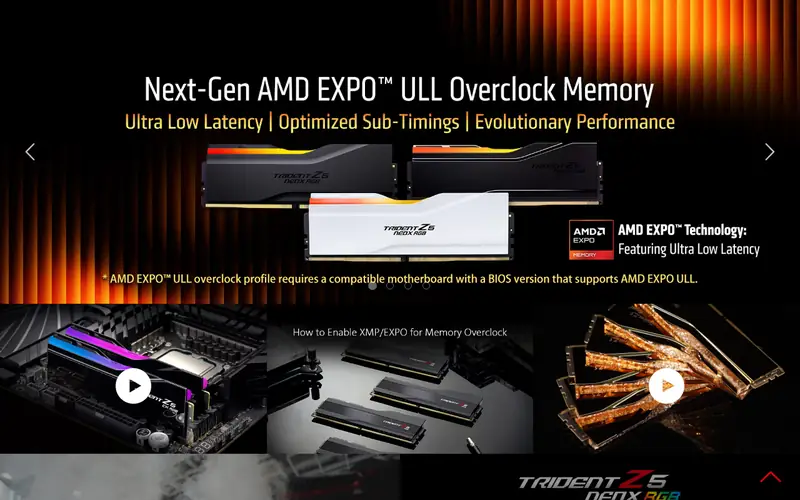
The Trident Z5 Neo RGB is G.Skill's AMD-focused DDR5 line, sold in 2x16GB and larger kits. The 6000MHz CL30 bin is a common pairing for Ryzen 7000 and 9000 series systems. G.Skill lists EXPO support on the Neo variants, and the RGB diffuser is controlled through the vendor's lighting software or motherboard sync.
It suits a build where looks matter and the case has room above the DIMM slots. The catch is height: the heat spreader is taller than plain kits, so check clearance under a big air cooler before buying. G.Skill lists a limited lifetime warranty on this series.
Where the price comes from
Check current retail price (2x16GB kit). Hardware prices move often, so check the G.Skill Trident Z5 Neo RGB 32GB 6000MHz CL30 maker page or a retailer before you buy.
Benefits
- Tuned for AMD EXPO
- RGB lighting with software control
- 6000MHz CL30 rating
Drawbacks
- Taller heat spreader than low-profile kits
- RGB adds cost
Use case to skip: this limit matters to you: taller heat spreader than low-profile kits.
Our take. A sensible pick for AMD AM5 builds that want RGB lighting.
If it does not fit, compare Corsair Vengeance DDR5 32GB 6000MHz CL30 or Kingston Fury Beast DDR5 32GB 5600MHz in this list.
- Best for
- Budget builds and plug-and-play reliability
- Standout
- Lower price tier than 6000MHz kits
- Starting price
- Check current retail price (2x16GB kit)
- Free plan or trial
- One-time hardware purchase
Fury Beast is Kingston's mainstream DDR5 line, offered in many capacities and speeds. The 5600MHz 2x16GB kit is a common value option. Kingston lists plug-and-play support plus XMP 3.0 profiles, and the heat spreader is low enough for most coolers.
It suits a build where the budget matters more than the last few percent of memory bandwidth, or a system where stability is the priority. The catch is that 5600MHz with looser timings gives up some performance versus 6000MHz CL30 kits, especially on AMD platforms that benefit from a 1:1 memory clock. Kingston lists a limited lifetime warranty.
Where the price comes from
Check current retail price (2x16GB kit). Hardware prices move often, so check the Kingston Fury Beast DDR5 32GB 5600MHz maker page or a retailer before you buy.
Benefits
- Lower price tier than 6000MHz kits
- low-profile design
- widely stocked
Drawbacks
- 5600MHz is slower than 6000MHz bins
- CL timings are looser than premium kits
Use case to skip: this limit matters to you: 5600MHz is slower than 6000MHz bins.
Our take. A sensible pick for budget builds and plug-and-play reliability.
If it does not fit, compare Corsair Vengeance DDR5 32GB 6000MHz CL30 or G.Skill Trident Z5 Neo RGB 32GB 6000MHz CL30 in this list.

- Best for
- Value builds that need low-profile modules
- Standout
- Low-profile heat spreader
- Starting price
- Check current retail price (2x16GB kit)
- Free plan or trial
- One-time hardware purchase
Crucial's Pro DDR5 line is aimed at buyers who want capacity and stability without lighting. The 2x16GB 5600MHz kit uses a low-profile heat spreader that fits under most large air coolers. Crucial lists XMP and EXPO profile support on these kits, so they can be tuned on either platform.
It suits office PCs, budget gaming builds and systems where the side panel stays on. The catch is the speed rating: 5600MHz is below the 6000MHz bins that many AMD builders prefer, so expect slightly lower bandwidth. Crucial lists a limited lifetime warranty on Pro memory.
Where the price comes from
Check current retail price (2x16GB kit). Hardware prices move often, so check the Crucial Pro DDR5 32GB 5600MHz maker page or a retailer before you buy.
Benefits
- Low-profile heat spreader
- no RGB
- simple XMP/EXPO setup
Drawbacks
- 5600MHz rating
- plainer looks than RGB kits
Use case to skip: this limit matters to you: 5600MHz rating.
Our take. A sensible pick for value builds that need low-profile modules.
If it does not fit, compare Corsair Vengeance DDR5 32GB 6000MHz CL30 or G.Skill Trident Z5 Neo RGB 32GB 6000MHz CL30 in this list.
- Best for
- Low-profile builds that still want 6000MHz
- Standout
- 6000MHz rating in a low-profile package
- Starting price
- Check current retail price (2x16GB kit)
- Free plan or trial
- One-time hardware purchase
T-Force Vulcan is TeamGroup's value-oriented DDR5 line. The 2x16GB 6000MHz kit pairs a modest heat spreader with XMP 3.0 and EXPO profiles, depending on the specific part number. The low profile makes it a practical choice for compact builds and big air coolers.
It suits a builder who wants 6000MHz speed without tall RGB modules. The catch is availability and bin variation: check the exact part number's rated timings and profile support on TeamGroup's site before buying, because the Vulcan line spans several speed and latency combinations. TeamGroup lists a limited lifetime warranty on this series.
Where the price comes from
Check current retail price (2x16GB kit). Hardware prices move often, so check the TeamGroup T-Force Vulcan DDR5 32GB 6000MHz maker page or a retailer before you buy.
Benefits
- 6000MHz rating in a low-profile package
- no RGB to pay for
- competitive pricing tier
Drawbacks
- Less widely stocked than major brands
- timings vary by bin
Use case to skip: this limit matters to you: less widely stocked than major brands.
Our take. A sensible pick for low-profile builds that still want 6000MHz.
If it does not fit, compare Corsair Vengeance DDR5 32GB 6000MHz CL30 or G.Skill Trident Z5 Neo RGB 32GB 6000MHz CL30 in this list.
- Best for
- AMD builds that skip RGB
- Standout
- EXPO-tuned for AM5
- Starting price
- Check current retail price (2x16GB kit)
- Free plan or trial
- One-time hardware purchase
Flare X5 is G.Skill's non-RGB AMD-oriented DDR5 line. The 2x16GB 6000MHz CL30 kit is built around EXPO profiles and a low heat spreader that clears most coolers. It is a common recommendation for Ryzen builds where the buyer does not want lighting.
It suits a clean, quiet AMD build. The catch is that the value proposition is narrower than a dual-profile kit: if you may move the memory to an Intel board later, check that the specific part number also lists an XMP profile. G.Skill lists a limited lifetime warranty.
Where the price comes from
Check current retail price (2x16GB kit). Hardware prices move often, so check the G.Skill Flare X5 32GB 6000MHz CL30 maker page or a retailer before you buy.
Benefits
- EXPO-tuned for AM5
- low-profile design
- 6000MHz CL30 rating
Drawbacks
- No lighting
- AMD-focused tuning is the main selling point
Use case to skip: this limit matters to you: no lighting.
Our take. A sensible pick for AMD builds that skip RGB.
If it does not fit, compare Corsair Vengeance DDR5 32GB 6000MHz CL30 or G.Skill Trident Z5 Neo RGB 32GB 6000MHz CL30 in this list.
- Best for
- Content work, virtual machines and heavy multitasking
- Standout
- 64GB in two modules
- Starting price
- Check current retail price (2x32GB kit)
- Free plan or trial
- One-time hardware purchase
This is a 2x32GB kit rated at 5600MHz. Two modules rather than four keeps load on the memory controller lower and leaves two slots open for a future upgrade. Corsair lists XMP 3.0 and EXPO support, and the heat spreader is the same low-profile style as the 32GB Vengeance kit.
It suits video editing, 3D work, virtual machines and anyone who keeps many applications open at once. The catch is price and speed: 64GB costs noticeably more, and 5600MHz is below the fastest bins. For pure gaming, 32GB is usually enough. Corsair lists a limited lifetime warranty.
Where the price comes from
Check current retail price (2x32GB kit). Hardware prices move often, so check the Corsair Vengeance DDR5 64GB 5600MHz maker page or a retailer before you buy.
Benefits
- 64GB in two modules
- leaves two slots free
- same low-profile family as the 32GB kit
Drawbacks
- Higher cost
- 5600MHz rather than 6000MHz
Use case to skip: this limit matters to you: higher cost.
Our take. A sensible pick for content work, virtual machines and heavy multitasking.
If it does not fit, compare Corsair Vengeance DDR5 32GB 6000MHz CL30 or G.Skill Trident Z5 Neo RGB 32GB 6000MHz CL30 in this list.
What specs matter when you buy
Capacity comes first. 32GB in two 16GB modules covers gaming, browsing and light creative work with headroom. 64GB in two 32GB modules suits video editing, virtual machines and heavy multitasking. Four-stick kits exist, but two sticks are easier on the memory controller and leave room to upgrade later.
Speed and latency work together. A 6000MHz CL30 kit and a 6400MHz CL32 kit can perform similarly in real workloads, so do not chase the highest number alone. On AMD AM5, a 1:1 ratio between memory and infinity fabric clocks is what makes 6000MHz a common target. On Intel boards, higher speeds are usually easier to reach, but stability still depends on the board and CPU.
Check the profile type. AMD boards use EXPO; Intel boards use XMP 3.0. Many kits list both, but not all. Confirm the exact part number on the vendor's Qualified Vendor List for your motherboard if you want the least risk. Also check module height against your CPU cooler, and confirm the kit is a desktop DIMM rather than SO-DIMM. Finally, remember that rated speeds require enabling the profile in BIOS.
Questions worth answering first
Buying checklist
- Confirm your motherboard supports DDR5 and lists the kit's exact part number on its QVL.
- Check whether your platform uses EXPO (AMD) or XMP (Intel) and that the kit lists the right profile.
- Measure clearance between the DIMM slots and your CPU cooler before choosing tall heat spreaders.
- Decide capacity first: 32GB for most builds, 64GB for heavy content work or virtual machines.
- Prefer a two-stick kit over four sticks unless you specifically need four modules.
- Verify the kit is a desktop DIMM and check the vendor's warranty terms before paying.
FAQ
Is 32GB of DDR5 enough for gaming?
For most current games, 32GB is comfortable and leaves room for a browser and other apps in the background. 16GB still works for many titles but leaves little headroom. Choose 64GB only if you also do video editing, 3D rendering or run virtual machines.
What speed DDR5 should I buy for AMD AM5?
DDR5-6000 with CL30 timings is a common target for AM5 builds because it supports a 1:1 memory clock ratio on many CPUs. Faster kits can work but may require manual tuning. Check your motherboard's QVL and enable EXPO in the BIOS.
Do I need to enable XMP or EXPO?
Yes. Without enabling the profile in BIOS, most DDR5 kits run at a slower default JEDEC speed. Enabling XMP on Intel or EXPO on AMD applies the rated speed and timings. If the system fails to boot, clear CMOS and try a lower profile.
Are two sticks better than four?
Usually yes. Two modules put less load on the memory controller and are easier to stabilize at high speeds. Four-stick kits can work, but reaching the rated speed is less certain. Two sticks also leave two slots free for a later upgrade.
Does RAM height matter?
It can. Tall heat spreaders and RGB diffusers may collide with large tower air coolers. Low-profile kits avoid the problem. Check the cooler's clearance specification and the module height on the vendor page before buying.
Is a higher MHz number always faster?
No. Speed and latency both matter, and platform support limits what you can actually run. A well-tuned 6000MHz CL30 kit can match or beat a higher-rated kit with looser timings. Stability on your specific board and CPU matters more than the headline number.
Sources we checked
Change log: First published 22 Nov 2026.