6 Best eGPU Enclosures in 2026
The Razer Core X Chroma is the safest pick for most people: a Thunderbolt 3 enclosure with a large PSU and room for full-length cards, sold at a published price. If you want the smallest possible footprint, look at the Razer Core X. If you want an open bench design for frequent card swaps, the Cooler Master MasterFrame 700 is a cheaper chassis-based route.
 By Shihab Mia · Published 22 Nov 2026
We run no ads and no affiliate links at launch. The order of a list follows our published method. How lists are ordered: how we score.
Prices are the starting prices vendors list publicly. Plans change, so confirm the current price on the vendor page before you buy.
Key takeaways
- Thunderbolt enclosures cap real-world gaming bandwidth well below a desktop PCIe x16 slot, so expect a frame-rate loss versus the same card in a tower.
- The Razer Core X Chroma lists at $399.99 and includes a 700W power supply, so most mid-range cards need no extra PSU.
- OCuLink and M.2-based adapters are cheaper but need an open M.2 slot and are not hot-swappable.
- Check card length, slot width and PSU wattage before buying; many enclosures fit only two-slot cards.
- Laptop support depends on the Thunderbolt controller and BIOS, not just the port shape.
Side-by-side
Grouped by fit and cost. Tap a product to jump to its full entry.
| Fit | Cost | |||
|---|---|---|---|---|
| Product | Best for | Standout feature | Listed starting price | Free plan or trial |
| 1Razer Core X Chroma | Plug-and-play Thunderbolt 3 builds with a big card | Large 700W internal PSU | Check current retail price | One-time hardware purchase |
| 2Razer Core X | A smaller, cheaper Razer enclosure | Lower price than the Chroma | Check current retail price | One-time hardware purchase |
| 3Akitio Node Titan | A compact metal Thunderbolt 3 chassis | Sturdy metal body | Check current retail price | One-time hardware purchase |
| 4Sonnet eGFX Breakaway Box 750 | Workstation and macOS users who need a known-good box | 750W PSU on the listed model | Check current retail price | One-time hardware purchase |
| 5Mantiz Saturn Pro | Users who want drive bays and extra ports in the same box | Space for internal storage | Check current retail price | One-time hardware purchase |
| 6ADT-Link OCuLink adapter kit | DIY users with an open M.2 slot | Much cheaper than a Thunderbolt box | Check current retail price | One-time hardware purchase |
How we picked
This guide is based on research, not lab testing. We read vendor product pages, spec sheets and compatibility documentation for each enclosure, then compared published figures for PSU wattage, card clearance, link type and port layout. Prices come from manufacturer list prices where published; where a vendor does not publish a current price, we say so rather than estimate. We also checked which models are still listed as current and sold, and dropped older enclosures that vendors no longer stock.
The 6 picks in detail

- Best for
- Plug-and-play Thunderbolt 3 builds with a big card
- Standout
- Large 700W internal PSU
- Starting price
- Check current retail price
- Free plan or trial
- One-time hardware purchase
The Core X Chroma is Razer's larger eGPU chassis. It connects over Thunderbolt 3 and carries a 700W power supply, which covers most current mid-range and upper mid-range cards without a second PSU. Razer lists support for full-length, two-slot cards, and the case adds USB ports plus RGB lighting.
It suits laptop owners who want one cable, one box and no tinkering. The catch is the link: Thunderbolt 3 carries four PCIe lanes, so a high-end card loses a noticeable share of its desktop performance, and the loss grows at higher frame rates. The box is also big and heavy for a desk.
Where the price comes from
Check current retail price. Hardware prices move often, so check the Razer Core X Chroma maker page or a retailer before you buy.
Benefits
- Large 700W internal PSU
- fits full-length, multi-slot cards
- Chroma lighting and extra USB ports
Drawbacks
- Thunderbolt 3 bandwidth limits fast cards
- large footprint on a desk
Use case to skip: this limit matters to you: thunderbolt 3 bandwidth limits fast cards.
Our take. A sensible pick for plug-and-play Thunderbolt 3 builds with a big card.
If it does not fit, compare Razer Core X or Akitio Node Titan in this list.
- Best for
- A smaller, cheaper Razer enclosure
- Standout
- Lower price than the Chroma
- Starting price
- Check current retail price
- Free plan or trial
- One-time hardware purchase
The Core X is the stripped-back version. It keeps the aluminium body and the internal PSU, listed at 650W, and drops the lighting and port hub. Razer lists it for full-length, two-slot cards, so most mainstream graphics cards fit.
It is the better buy if you do not need the extras and want to spend the difference on the card itself. The trade-offs are the same as any Thunderbolt enclosure: four PCIe lanes, a laptop that must support Thunderbolt, and a chassis that still takes real desk space.
Where the price comes from
Check current retail price. Hardware prices move often, so check the Razer Core X maker page or a retailer before you buy.
Benefits
- Lower price than the Chroma
- 650W PSU included
- simpler, quieter case
Drawbacks
- No RGB or extra port hub
- same Thunderbolt bandwidth ceiling
Use case to skip: this limit matters to you: no RGB or extra port hub.
Our take. A sensible pick for A smaller, cheaper Razer enclosure.
If it does not fit, compare Razer Core X Chroma or Akitio Node Titan in this list.
- Best for
- A compact metal Thunderbolt 3 chassis
- Standout
- Sturdy metal body
- Starting price
- Check current retail price
- Free plan or trial
- One-time hardware purchase
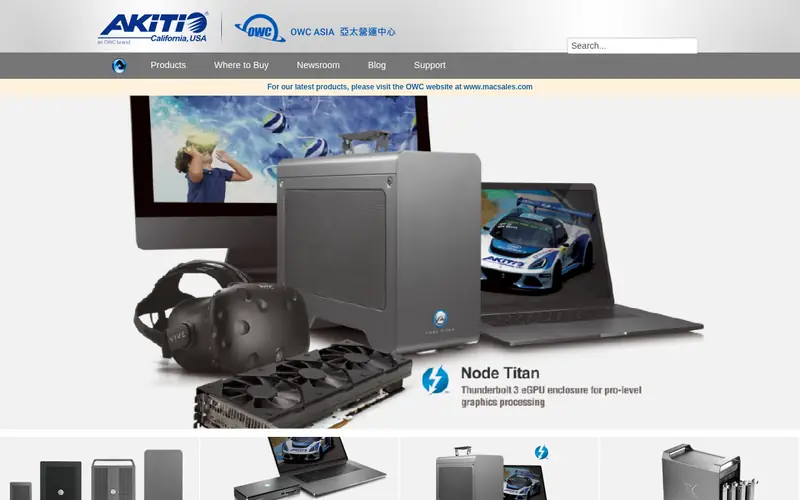
The Node Titan is Akitio's Thunderbolt 3 enclosure with an internal power supply and a metal shell. Akitio lists it for full-length, dual-slot cards and positions it for laptop users who want a single-cable connection.
It sits between the Razer boxes and the DIY route: finished enough to be plug-and-play, but with fewer extras than the Chroma. Check the current vendor page for the exact PSU rating and card clearance before ordering, because Akitio has revised these enclosures over time.
Where the price comes from
Check current retail price. Hardware prices move often, so check the Akitio Node Titan maker page or a retailer before you buy.
Benefits
- Sturdy metal body
- internal PSU
- tool-less card access on the listed design
Drawbacks
- Thunderbolt 3 bandwidth limit
- availability varies by region
Use case to skip: this limit matters to you: thunderbolt 3 bandwidth limit.
Our take. A sensible pick for A compact metal Thunderbolt 3 chassis.
If it does not fit, compare Razer Core X Chroma or Razer Core X in this list.

- Best for
- Workstation and macOS users who need a known-good box
- Standout
- 750W PSU on the listed model
- Starting price
- Check current retail price
- Free plan or trial
- One-time hardware purchase
Sonnet's Breakaway Box line is aimed at professional and Mac users as much as gamers. The 750 variant carries a 750W power supply and is documented for a wide range of cards, with Sonnet publishing compatibility notes on its site.
That documentation is the reason to pick it: on macOS and in workstation apps, knowing a card is supported matters more than raw bandwidth. The catch is price and size. It is a big, serious box, and Thunderbolt still limits gaming frame rates compared with an internal card.
Where the price comes from
Check current retail price. Hardware prices move often, so check the Sonnet eGFX Breakaway Box 750 maker page or a retailer before you buy.
Benefits
- 750W PSU on the listed model
- broad OS support documentation
- solid build
Drawbacks
- Higher price than consumer boxes
- large case
Use case to skip: this limit matters to you: higher price than consumer boxes.
Our take. A sensible pick for workstation and macOS users who need a known-good box.
If it does not fit, compare Razer Core X Chroma or Razer Core X in this list.
- Best for
- Users who want drive bays and extra ports in the same box
- Standout
- Space for internal storage
- Starting price
- Check current retail price
- Free plan or trial
- One-time hardware purchase
The Saturn Pro is a Thunderbolt enclosure that adds more than a PCIe slot. Mantiz lists internal drive mounting and a port hub alongside the graphics card bay, so one cable can carry display output, storage and peripherals.
It suits people building a single-dock desk around a laptop. The trade-off is size and airflow: packing a card, drives and a PSU into one box leaves less room for big coolers, so check the listed maximum card dimensions before buying a large graphics card.
Where the price comes from
Check current retail price. Hardware prices move often, so check the Mantiz Saturn Pro maker page or a retailer before you buy.
Benefits
- Space for internal storage
- extra USB and Ethernet ports on listed models
- internal PSU
Drawbacks
- Larger than a bare enclosure
- card clearance is tighter than full-tower boxes
Use case to skip: this limit matters to you: larger than a bare enclosure.
Our take. A sensible pick for users who want drive bays and extra ports in the same box.
If it does not fit, compare Razer Core X Chroma or Razer Core X in this list.
- Best for
- DIY users with an open M.2 slot
- Standout
- Much cheaper than a Thunderbolt box
- Starting price
- Check current retail price
- Free plan or trial
- One-time hardware purchase
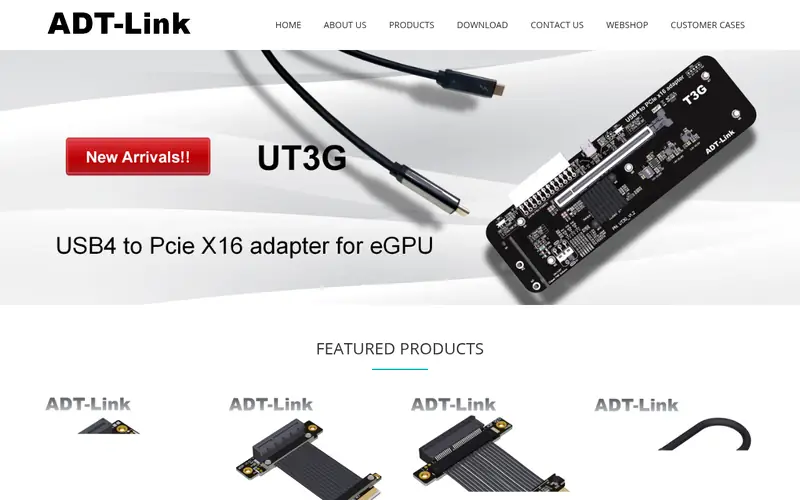
ADT-Link sells OCuLink and M.2-to-PCIe adapter cables and boards for DIY eGPU builds. The card sits in a small powered riser board, and the link runs over OCuLink, which carries more PCIe lanes than Thunderbolt 3 and therefore loses less performance.
This is the budget and performance route, but it is not a consumer product. You need an exposed M.2 slot, a separate ATX PSU or a powered board, and a way to mount the card. There is no hot-swap and no warranty cover for a laptop damaged during the mod, so treat it as a project, not a purchase.
Where the price comes from
Check current retail price. Hardware prices move often, so check the ADT-Link OCuLink adapter kit maker page or a retailer before you buy.
Benefits
- Much cheaper than a Thunderbolt box
- OCuLink carries more PCIe lanes
- small and light
Drawbacks
- Needs an open M.2 slot and case modding
- not hot-swappable
- no PSU included
Use case to skip: this limit matters to you: needs an open M.2 slot and case modding.
Our take. A sensible pick for DIY users with an open M.2 slot.
If it does not fit, compare Razer Core X Chroma or Razer Core X in this list.
What specs matter when you buy
The link is the first limit. Thunderbolt 3 and 4 enclosures provide four PCIe lanes, while a desktop motherboard gives a graphics card sixteen. The card still works, but frame rates drop, and the drop is larger for fast cards and high-refresh gaming. OCuLink and M.2 adapters carry more lanes and lose less performance, at the cost of opening the laptop and losing hot-swap.
Power is the second limit. Check the enclosure's internal PSU wattage against your card's board power, and check the connector count: many cards need two or three eight-pin feeds. A 650W box is fine for mid-range cards but tight for a flagship. If the enclosure has no PSU, budget for a quality ATX unit as well.
Physical clearance decides whether the card fits at all. Vendors list maximum card length, slot width and sometimes height. Two-slot cards are the safe default; three-slot cards often do not fit. Also confirm the laptop side: the port must be Thunderbolt, the BIOS must allow external graphics, and on macOS only certain cards are supported. Finally, check the warranty terms, since some vendors void cover if you open the enclosure.
Questions worth answering first
Buying checklist
- Confirm your laptop port is Thunderbolt and that the vendor documents external graphics support.
- Check the enclosure's maximum card length and slot width against your exact card model.
- Compare the internal PSU wattage and connector count with your card's board power.
- Decide whether you need hot-swap and a single cable, which rules out OCuLink mods.
- On macOS, check the vendor's supported-card list before buying anything.
- Read the warranty terms for opening the enclosure and for card damage.
FAQ
Do eGPU enclosures lose performance?
Yes. Thunderbolt 3 and 4 give the card four PCIe lanes instead of sixteen, so frame rates are lower than the same card in a desktop. The loss is small in GPU-bound scenes at high resolution and larger at high frame rates or low resolution.
Can any laptop use an eGPU?
No. The laptop needs a Thunderbolt port and firmware that supports external graphics. Some business laptops lock this down. Check the manufacturer's documentation for your exact model before buying an enclosure.
Is OCuLink better than Thunderbolt for eGPUs?
OCuLink carries more PCIe lanes, so it loses less performance, and the adapters cost far less. The catch is that it needs an open M.2 slot, is not hot-swappable, and requires case modding. Thunderbolt is slower but far simpler.
Do I need a separate power supply?
Only if the enclosure does not include one. Razer and Sonnet boxes ship with internal PSUs. Open-frame and OCuLink builds need a standard ATX power supply, which adds to the total cost.
Will an eGPU work with a desktop mini PC?
Sometimes. A mini PC with Thunderbolt can use a standard enclosure. A mini PC without it needs an OCuLink or M.2 adapter and an open slot, which most small chassis do not have.
What card should I put in an eGPU?
A mid-range card makes the most sense. Fast cards lose proportionally more performance over four lanes, and they stress the enclosure's PSU and cooling. Match the card to the enclosure's wattage and clearance.
Sources we checked
Change log: First published 22 Nov 2026.