7 Best Laptop Stands in 2026
The Rain Design mStand360 is the best laptop stand for most desk setups, with a rotating base and a rigid aluminum body that suits people who leave a laptop in one place. For a cheaper fixed riser, the Amazon Basics Aluminum Laptop Stand covers the basics. If you travel, the Roost V3 Laptop Stand folds into a small package and fits in a bag.
 By Shihab Mia · Published 22 Nov 2026
We run no ads and no affiliate links at launch. The order of a list follows our published method. How lists are ordered: how we score.
Prices are the starting prices vendors list publicly. Plans change, so confirm the current price on the vendor page before you buy.
Key takeaways
- Prices range from roughly $25 for a basic fixed riser to about $100 for a rotating aluminum stand.
- Height matters most: a stand should lift the screen so the top edge sits near eye level.
- Most stands hold laptops up to around 15 to 17 inches; check the listed limit before buying.
- Portable stands trade rigidity for packability and often weigh under 300 grams.
- A stand raises the screen but does not cool the laptop unless it has open airflow design.
Side-by-side
Grouped by fit and cost. Tap a product to jump to its full entry.
| Fit | Cost | |||
|---|---|---|---|---|
| Product | Best for | Standout feature | Listed starting price | Free plan or trial |
| 1Rain Design mStand360 | Fixed desk setups with a rotating base | Rotating base for sharing the screen | Check current retail price | One-time hardware purchase |
| 2Amazon Basics Aluminum Laptop Stand | Budget fixed riser | Low cost | Check current retail price | One-time hardware purchase |
| 3Roost V3 Laptop Stand | Travel and portable use | Folds into a small package | Check current retail price | One-time hardware purchase |
| 4Twelve South Curve Flex | Flexible height and angle on a desk | Adjustable height and angle | Check current retail price | One-time hardware purchase |
| 5Nexstand K2 Laptop Stand | Lightweight portable riser | Very light for travel | Check current retail price | One-time hardware purchase |
| 6Satechi Aluminum Laptop Stand | Matching aluminum desk aesthetics | Clean aluminum finish | Check current retail price | One-time hardware purchase |
| 7Boyata Laptop Stand | Adjustable budget desk stand | Adjustable height and angle | Check current retail price | One-time hardware purchase |
How we picked
This comparison is based on vendor product pages, published spec sheets and manufacturer list prices. We checked each stand's stated laptop size range, adjustability, materials and portability, then grouped them by use case: fixed desk, adjustable desk and travel. No hands-on testing was performed. Prices are manufacturer list prices where published; otherwise we note that buyers should check the current retail price. Features and limits can change, so confirm details on the vendor site before buying.
The 7 picks in detail
- Best for
- Fixed desk setups with a rotating base
- Standout
- Rotating base for sharing the screen
- Starting price
- Check current retail price
- Free plan or trial
- One-time hardware purchase
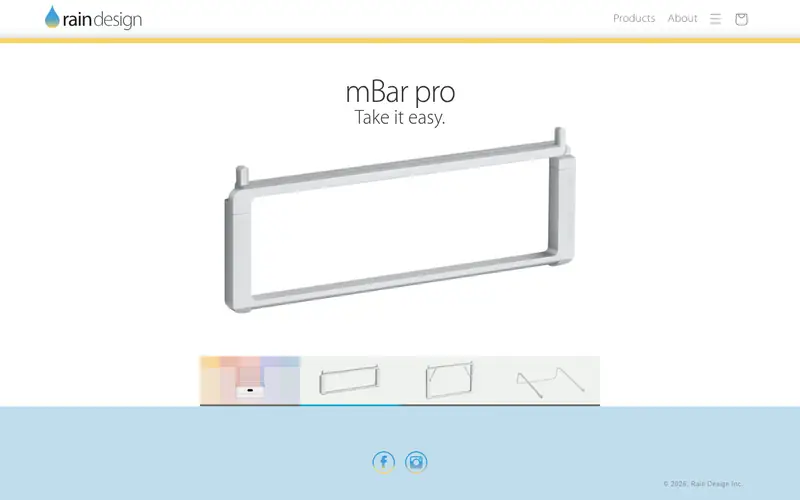
The mStand360 is a sandblasted aluminum stand with a base that swivels, so you can turn the laptop toward someone else without lifting it. Rain Design lists it for Apple laptops and other notebooks, with a curved front lip that holds the machine in place. The open design leaves the underside of the laptop exposed, which helps airflow compared with a flat desk.
It suits people who keep a laptop docked at one desk and want a stable, good-looking riser. The catch is that height and tilt are fixed, so it only works if the resulting screen height matches your chair and desk. Check the listed laptop size range before ordering.
Where the price comes from
Check current retail price. Hardware prices move often, so check the Rain Design mStand360 maker page or a retailer before you buy.
Benefits
- Rotating base for sharing the screen
- single-piece aluminum body
- cable routing hole at the back
Drawbacks
- Fixed height and angle
- premium price
Use case to skip: this limit matters to you: fixed height and angle.
Our take. A sensible pick for fixed desk setups with a rotating base.
If it does not fit, compare Amazon Basics Aluminum Laptop Stand or Roost V3 Laptop Stand in this list.

- Best for
- Budget fixed riser
- Standout
- Low cost
- Starting price
- Check current retail price
- Free plan or trial
- One-time hardware purchase
This is a straightforward fixed riser in silver aluminum. It lifts the laptop at a set angle and leaves the back open so cables can pass through. Amazon Basics positions it as a general-purpose stand for laptops and tablets, and the build is simple rather than premium.
It suits buyers who want a cheap way to raise a screen and do not need adjustability. The main catch is the lack of height or angle control, so measure your desk first. Confirm the supported laptop size on the product page, since listings can change.
Where the price comes from
Check current retail price. Hardware prices move often, so check the Amazon Basics Aluminum Laptop Stand maker page or a retailer before you buy.
Benefits
- Low cost
- simple aluminum design
- open back for cables
Drawbacks
- No height adjustment
- basic finish
Use case to skip: this limit matters to you: no height adjustment.
Our take. A sensible pick for budget fixed riser.
If it does not fit, compare Rain Design mStand360 or Roost V3 Laptop Stand in this list.
- Best for
- Travel and portable use
- Standout
- Folds into a small package
- Starting price
- Check current retail price
- Free plan or trial
- One-time hardware purchase
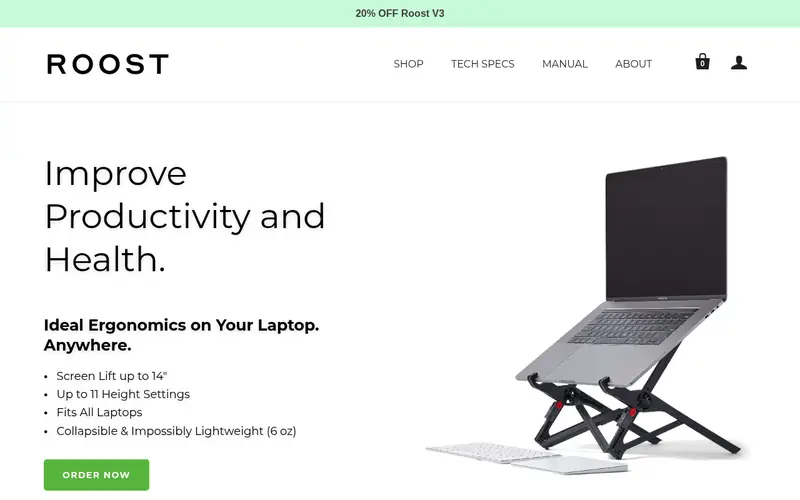
The Roost V3 is a collapsible stand that folds down for transport and opens into a raised platform. It uses adjustable legs and a cradle that holds the laptop at a working height, and the company lists it as compatible with a range of laptop sizes. It is aimed at people who work from different desks, cafes or hotels.
It suits remote workers and travellers who want a proper screen height away from home. The catch is that it costs more than many fixed desk stands and takes a moment to set up and pack away. Check the current size and weight limits on the vendor page.
Where the price comes from
Check current retail price. Hardware prices move often, so check the Roost V3 Laptop Stand maker page or a retailer before you buy.
Benefits
- Folds into a small package
- adjustable height
- lightweight for a bag
Drawbacks
- Higher price than desk stands
- needs assembly each time
Use case to skip: this limit matters to you: higher price than desk stands.
Our take. A sensible pick for travel and portable use.
If it does not fit, compare Rain Design mStand360 or Amazon Basics Aluminum Laptop Stand in this list.

- Best for
- Flexible height and angle on a desk
- Standout
- Adjustable height and angle
- Starting price
- Check current retail price
- Free plan or trial
- One-time hardware purchase
The Curve Flex is an aluminum stand with adjustable arms that let you change height and viewing angle. Twelve South lists it for MacBook and other laptops, and it folds flat when not in use. The curved shape is designed to keep the laptop stable at different angles.
It suits people who share a desk or want to fine-tune screen height without buying a monitor arm. The catch is that it is built for desk use and does not pack as small as a travel stand. Check the listed laptop size range before buying.
Where the price comes from
Check current retail price. Hardware prices move often, so check the Twelve South Curve Flex maker page or a retailer before you buy.
Benefits
- Adjustable height and angle
- aluminum build
- folds for storage
Drawbacks
- Desk-only design
- not as compact as travel stands
Use case to skip: this limit matters to you: desk-only design.
Our take. A sensible pick for flexible height and angle on a desk.
If it does not fit, compare Rain Design mStand360 or Amazon Basics Aluminum Laptop Stand in this list.
- Best for
- Lightweight portable riser
- Standout
- Very light for travel
- Starting price
- Check current retail price
- Free plan or trial
- One-time hardware purchase
The Nexstand K2 is a folding stand made largely from plastic and light metal parts. It opens into an X-shaped frame that raises the laptop and adjusts in height, and it collapses into a slim package for a backpack. The company markets it for mobile workers.
It suits people who carry a stand every day and want to keep bag weight down. The catch is that a light folding frame flexes more than a solid aluminum riser, so it is less suited to heavy typing directly on the laptop. Check the current weight and size limits.
Where the price comes from
Check current retail price. Hardware prices move often, so check the Nexstand K2 Laptop Stand maker page or a retailer before you buy.
Benefits
- Very light for travel
- folds small
- adjustable height
Drawbacks
- Less rigid than aluminum desk stands
- plastic parts
Use case to skip: this limit matters to you: less rigid than aluminum desk stands.
Our take. A sensible pick for lightweight portable riser.
If it does not fit, compare Rain Design mStand360 or Amazon Basics Aluminum Laptop Stand in this list.

- Best for
- Matching aluminum desk aesthetics
- Standout
- Clean aluminum finish
- Starting price
- Check current retail price
- Free plan or trial
- One-time hardware purchase
Satechi makes several aluminum stands, including fixed and adjustable designs. The common traits are a machined aluminum body, rubber pads to protect the laptop and an open frame that leaves the underside exposed. The finish is chosen to match silver and space grey laptops.
It suits buyers who want a desk stand that looks consistent with their hardware. The catch is that the range includes different models with different adjustability, so check which one you are buying. Confirm the supported laptop size on the product page.
Where the price comes from
Check current retail price. Hardware prices move often, so check the Satechi Aluminum Laptop Stand maker page or a retailer before you buy.
Benefits
- Clean aluminum finish
- open design for airflow
- compact footprint
Drawbacks
- Limited adjustability
- price varies by model
Use case to skip: this limit matters to you: limited adjustability.
Our take. A sensible pick for matching aluminum desk aesthetics.
If it does not fit, compare Rain Design mStand360 or Amazon Basics Aluminum Laptop Stand in this list.
- Best for
- Adjustable budget desk stand
- Standout
- Adjustable height and angle
- Starting price
- Check current retail price
- Free plan or trial
- One-time hardware purchase
The Boyata stand is an adjustable aluminum riser with a hinged design that lets you set height and tilt. It folds flat for storage and has vent cutouts under the laptop. It is sold at a budget price compared with premium desk stands.
It suits buyers who want adjustability without spending much. The catch is that lighter aluminum can flex under a large laptop, and the finish is not as refined as higher-priced models. Check the listed maximum laptop size before ordering.
Where the price comes from
Check current retail price. Hardware prices move often, so check the Boyata Laptop Stand maker page or a retailer before you buy.
Benefits
- Adjustable height and angle
- low price
- folds for storage
Drawbacks
- Aluminum build is lighter than premium stands
- finish varies
Use case to skip: this limit matters to you: aluminum build is lighter than premium stands.
Our take. A sensible pick for adjustable budget desk stand.
If it does not fit, compare Rain Design mStand360 or Amazon Basics Aluminum Laptop Stand in this list.
What specs matter when you buy
The first thing to check is height. A stand should raise the laptop so the top of the screen sits close to eye level when you sit upright. Most fixed stands lift the screen by a set amount, while adjustable models let you tune it. If the stand is too low, you will still look down and strain your neck.
Next, check the supported laptop size and weight. Vendors list a range, often around 11 to 17 inches, and some list a maximum weight. A stand rated for a small ultrabook may flex under a larger machine. Also look at the contact points: rubber pads protect the finish and stop the laptop sliding.
Build material affects stability and weight. Aluminum stands are rigid and suit desk use; plastic and folding stands are lighter for travel but flex more. If you type directly on the laptop keyboard while it is on a stand, a rigid stand matters more. Finally, check cable routing and airflow. An open frame helps heat escape, and a rear opening keeps cables tidy. Measure your desk and chair height before choosing a fixed model.
Questions worth answering first
Buying checklist
- Measure your seated eye level and check the stand's listed height before buying.
- Confirm the stand supports your laptop's screen size and weight.
- Decide whether you need fixed height or adjustable height and tilt.
- Check whether you will type on the laptop keyboard or use an external one.
- Look for rubber pads and an open frame for stability and airflow.
- Compare the folded size and weight if you plan to travel with the stand.
FAQ
Do laptop stands really help posture?
A stand raises the screen toward eye level, which can reduce downward neck angle. It works best with an external keyboard and mouse, because typing on a raised laptop can strain your wrists. The stand is one part of a setup, not a complete fix.
Can I use a laptop stand with an external monitor?
Yes. Many people use a stand to keep the laptop screen as a second display beside a monitor. Check that the stand height lets both screens sit at a comfortable level, and confirm the stand's size limit for your laptop.
Are expensive aluminum stands worth it?
Aluminum stands are usually more rigid and stable than plastic or folding models. Whether that matters depends on use: a fixed desk stand benefits from rigidity, while a travel stand trades it for low weight. Compare specs rather than price alone.
Will a stand make my laptop run cooler?
An open stand that exposes the underside can help airflow compared with a flat desk. The effect depends on the laptop's vents and fan design. A stand is not a replacement for cleaning vents or using the laptop on a hard surface.
What size laptop do most stands support?
Many stands list support for laptops around 11 to 17 inches, but ranges vary by model. Always check the vendor's stated limit for your specific machine, especially for larger 16- or 17-inch laptops.
Can I type on a laptop while it is on a stand?
You can, but a raised and tilted deck can make typing less comfortable and less stable. For long sessions, an external keyboard and mouse at desk level is the more common setup. Choose a rigid stand if you plan to type directly on the laptop.
Sources we checked
Change log: First published 22 Nov 2026.