7 Best Graphing Calculators for High School and College in 2026
The TI-84 Plus CE is the safest pick for most high school and college students because it is the model most US math teachers and standardized exams expect. Choose the NumWorks Graphing Calculator if you want a modern interface and Python built in at a lower price. Choose the Casio fx-CG50 if you want a color screen with strong graphing and a lower street price than the TI.
 By Shihab Mia · Published 28 Nov 2026
We run no ads and no affiliate links at launch. The order of a list follows our published method. How lists are ordered: how we score.
Prices are the starting prices vendors list publicly. Plans change, so confirm the current price on the vendor page before you buy.
Key takeaways
- The TI-84 Plus CE is the most widely accepted model for US high school math and SAT, ACT and AP exams.
- The NumWorks Graphing Calculator sells for about $99.99 and includes Python, a color screen and a rechargeable battery.
- The Casio fx-CG50 is often cheaper than the TI-84 Plus CE and includes a color display and a large catalog of functions.
- The HP Prime is the most powerful model here, with a touchscreen and a computer algebra system, but some exams restrict CAS devices.
- Check your exam's approved calculator list before buying: CAS models are banned on several standardized tests.
Side-by-side
Grouped by fit and cost. Tap a product to jump to its full entry.
| Fit | Cost | |||
|---|---|---|---|---|
| Product | Best for | Standout feature | Listed starting price | Free plan or trial |
| 1TI-84 Plus CE | The standard choice for US high school and college math | Widely accepted on standardized exams | Check current retail price | One-time hardware purchase |
| 2NumWorks Graphing Calculator | Students who want Python and a clean interface at a lower price | Python built in | Check current retail price | One-time hardware purchase |
| 3Casio fx-CG50 | Color graphing at a lower price than the TI | Color display | Check current retail price | One-time hardware purchase |
| 4HP Prime Graphing Calculator | Advanced math, engineering and CAS work | Touchscreen | Check current retail price | One-time hardware purchase |
| 5TI-Nspire CX II | Classes that use TI-Nspire activities and documents | Color screen | Check current retail price | One-time hardware purchase |
| 6Casio fx-9750GIII | Basic graphing on a tight budget | Lower price than color models | Check current retail price | One-time hardware purchase |
| 7TI-84 Plus CE Python Edition | TI-84 users who need Python for class | Same TI-84 interface | Check current retail price | One-time hardware purchase |
How we picked
We compared these models using manufacturer product pages, published spec sheets, official user guides and vendor list prices. We checked which exams each model is accepted on where the vendor or exam board publishes that information, and we noted screen type, battery, programming support and CAS status. We did not run hands-on tests. Prices change by retailer and season, so confirm the current price and the approved calculator list before you buy.
The 7 picks in detail
- Best for
- The standard choice for US high school and college math
- Standout
- Widely accepted on standardized exams
- Starting price
- Check current retail price
- Free plan or trial
- One-time hardware purchase
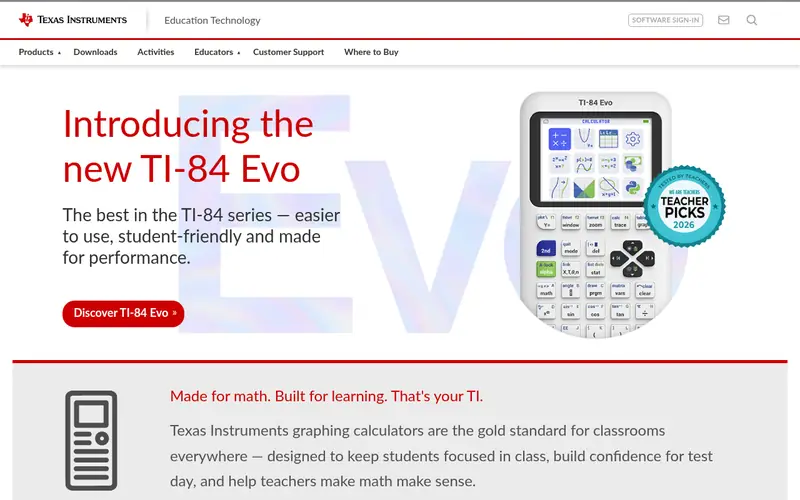
The TI-84 Plus CE is the model most US math teachers build lessons around, and it is on the approved list for the SAT, ACT and many AP exams. It has a backlit color screen, a rechargeable battery and a slim body. Texas Instruments lists it with graphing, statistics, matrices and a programming environment. It does not include a computer algebra system, which is why it stays acceptable on exams that ban CAS devices. The catch is price: it costs more than the Casio and NumWorks options, and the hardware platform is older than the competition. For most students who want zero friction with teachers and exams, it remains the default.
Where the price comes from
Check current retail price. Hardware prices move often, so check the TI-84 Plus CE maker page or a retailer before you buy.
Benefits
- Widely accepted on standardized exams
- large installed base of classroom materials
- rechargeable battery
Drawbacks
- Higher price than most rivals
- no computer algebra system
Use case to skip: this limit matters to you: higher price than most rivals.
Our take. A sensible pick for the standard choice for US high school and college math.
If it does not fit, compare NumWorks Graphing Calculator or Casio fx-CG50 in this list.
- Best for
- Students who want Python and a clean interface at a lower price
- Standout
- Python built in
- Starting price
- Check current retail price
- Free plan or trial
- One-time hardware purchase
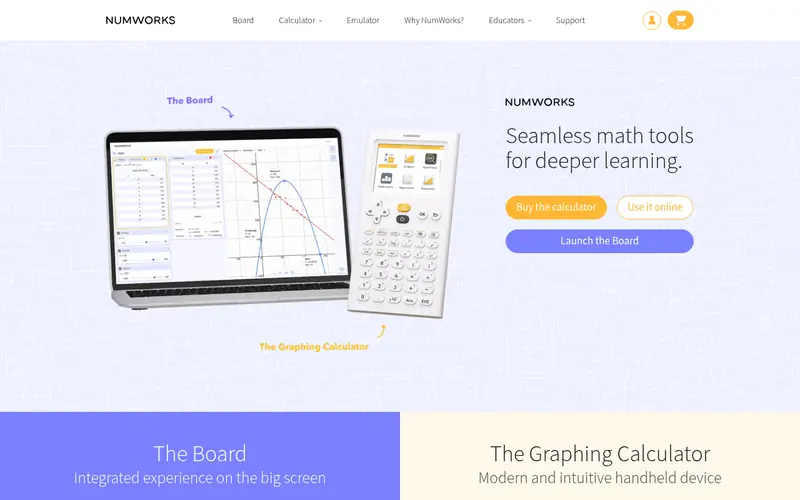
NumWorks sells its graphing calculator directly and lists it at about $99.99. It has a color screen, a rechargeable battery and a simplified menu system designed to be learned quickly. Python is included, which matters for courses that teach programming alongside math. The company also publishes a free online emulator and a simulator, so students can try the interface before buying. The main catch is classroom support: far fewer textbooks and teacher guides are written around NumWorks than around the TI-84. Check your exam's approved list, because NumWorks is accepted on some tests but not all.
Where the price comes from
Check current retail price. Hardware prices move often, so check the NumWorks Graphing Calculator maker page or a retailer before you buy.
Benefits
- Python built in
- color screen
- rechargeable battery
Drawbacks
- Smaller classroom ecosystem than TI
- fewer teacher materials
Use case to skip: this limit matters to you: smaller classroom ecosystem than TI.
Our take. A sensible pick for students who want Python and a clean interface at a lower price.
If it does not fit, compare TI-84 Plus CE or Casio fx-CG50 in this list.
- Best for
- Color graphing at a lower price than the TI
- Standout
- Color display
- Starting price
- Check current retail price
- Free plan or trial
- One-time hardware purchase
The Casio fx-CG50 is a color graphing calculator with a large display and a broad set of functions for graphing, statistics, matrices and sequences. Casio publishes a detailed user guide and a library of classroom activities. It is a common choice in schools outside the US and increasingly in US classrooms. The catch is familiarity. Students who switch from a TI-84 have to relearn menu paths, and some teachers hand out TI-specific instructions. Check the approved calculator list for your exam before buying, since acceptance varies by test.
Where the price comes from
Check current retail price. Hardware prices move often, so check the Casio fx-CG50 maker page or a retailer before you buy.
Benefits
- Color display
- strong graphing and statistics features
- often cheaper than the TI-84 Plus CE
Drawbacks
- Menu system differs from TI
- fewer US classroom materials
Use case to skip: this limit matters to you: menu system differs from TI.
Our take. A sensible pick for color graphing at a lower price than the TI.
If it does not fit, compare TI-84 Plus CE or NumWorks Graphing Calculator in this list.

- Best for
- Advanced math, engineering and CAS work
- Standout
- Touchscreen
- Starting price
- Check current retail price
- Free plan or trial
- One-time hardware purchase
The HP Prime is the most capable calculator in this group. It has a color touchscreen, a computer algebra system and a large feature set for calculus, linear algebra and statistics. HP publishes a user guide and a companion app for phones and computers. The catch is exam rules. Many standardized tests ban calculators with a CAS, so the HP Prime is a poor choice for students who need one device for both class and the SAT or ACT. It suits college students in engineering and advanced math who do not face those restrictions.
Where the price comes from
Check current retail price. Hardware prices move often, so check the HP Prime Graphing Calculator maker page or a retailer before you buy.
Benefits
- Touchscreen
- computer algebra system
- powerful graphing
Drawbacks
- CAS is banned on some exams
- higher price
Use case to skip: this limit matters to you: CAS is banned on some exams.
Our take. A sensible pick for advanced math, engineering and CAS work.
If it does not fit, compare TI-84 Plus CE or NumWorks Graphing Calculator in this list.
- Best for
- Classes that use TI-Nspire activities and documents
- Standout
- Color screen
- Starting price
- Check current retail price
- Free plan or trial
- One-time hardware purchase
The TI-Nspire CX II is Texas Instruments' document-based graphing calculator. It stores work in files, supports dynamic graphing and links to computer software for classroom activities. It has a color screen and a rechargeable battery. It is a strong pick when a teacher already uses Nspire activities, because the class materials match the device. The catch is that the workflow differs from the TI-84, and the CAS version is banned on several exams. Confirm which version your course and exam allow before buying.
Where the price comes from
Check current retail price. Hardware prices move often, so check the TI-Nspire CX II maker page or a retailer before you buy.
Benefits
- Color screen
- document-based workflow
- rechargeable battery
Drawbacks
- Different workflow from the TI-84
- CAS version restricted on some exams
Use case to skip: this limit matters to you: different workflow from the TI-84.
Our take. A sensible pick for classes that use TI-Nspire activities and documents.
If it does not fit, compare TI-84 Plus CE or NumWorks Graphing Calculator in this list.
- Best for
- Basic graphing on a tight budget
- Standout
- Lower price than color models
- Starting price
- Check current retail price
- Free plan or trial
- One-time hardware purchase
The Casio fx-9750GIII is a monochrome graphing calculator aimed at students who need the basics without paying for a color screen. Casio lists Python support on this model, which is unusual at its price point. It handles graphing, statistics, matrices and tables. The catch is the display. A monochrome screen is harder to read for complex graphs, and the feature set is smaller than the fx-CG50. It suits students on a tight budget or a backup device, not someone who wants the richest graphing experience.
Where the price comes from
Check current retail price. Hardware prices move often, so check the Casio fx-9750GIII maker page or a retailer before you buy.
Benefits
- Lower price than color models
- Python support
- solid graphing basics
Drawbacks
- Monochrome display
- fewer features than the fx-CG50
Use case to skip: this limit matters to you: monochrome display.
Our take. A sensible pick for basic graphing on a tight budget.
If it does not fit, compare TI-84 Plus CE or NumWorks Graphing Calculator in this list.
- Best for
- TI-84 users who need Python for class
- Standout
- Same TI-84 interface
- Starting price
- Check current retail price
- Free plan or trial
- One-time hardware purchase
The TI-84 Plus CE Python Edition adds a Python programming environment to the familiar TI-84 Plus CE platform. Students who already know the TI-84 menus can move to it without relearning anything, and it keeps the color screen and rechargeable battery. The catch is price and scope. It costs more than the standard TI-84 Plus CE, and its Python tools are simpler than what you get on a computer. Buy it only if your course requires Python on a TI-84, not as a general upgrade.
Where the price comes from
Check current retail price. Hardware prices move often, so check the TI-84 Plus CE Python Edition maker page or a retailer before you buy.
Benefits
- Same TI-84 interface
- Python built in
- rechargeable battery
Drawbacks
- Pricier than the standard TI-84 Plus CE
- Python tools are basic
Use case to skip: this limit matters to you: pricier than the standard TI-84 Plus CE.
Our take. A sensible pick for TI-84 users who need Python for class.
If it does not fit, compare TI-84 Plus CE or NumWorks Graphing Calculator in this list.
What specs matter most when buying a graphing calculator?
The first thing to check is the exam approved list, not the spec sheet. A powerful calculator that your exam bans is useless on test day. After that, look at screen type, battery, programming support and whether the model has a computer algebra system. Screen type matters for reading graphs: color displays are easier to follow for multiple functions, while monochrome models are cheaper. Battery type matters for daily use: rechargeable models avoid buying AA cells, while AA models are easy to swap. Programming support matters if your course teaches Python or basic coding. CAS is the biggest dividing line. A computer algebra system can solve symbolic equations, which helps in college math but gets the device banned on many standardized tests. If you need one calculator for both class and exams, choose a non-CAS model such as the TI-84 Plus CE or the NumWorks Graphing Calculator.
Which graphing calculator should I buy if my exam bans CAS?
Buy a non-CAS model: the TI-84 Plus CE for the widest exam acceptance, the NumWorks Graphing Calculator for Python at a lower price, or the Casio fx-CG50 for color graphing on a budget. All three avoid a computer algebra system. Skip the HP Prime and the CAS version of the TI-Nspire CX II if your exam bans symbolic math. Also confirm the exact model name on your exam's approved list, because rules differ between the SAT, ACT and AP exams, and some states set their own policies.
Questions worth answering first
Buying checklist
- Check your exam's official approved calculator list and confirm the exact model name.
- Confirm whether the model has a CAS, since CAS devices are banned on several tests.
- Decide whether you need Python support for your course.
- Compare screen type: color is easier to read, monochrome is cheaper.
- Check the battery type and whether it is rechargeable or uses standard cells.
- Ask your teacher which model the class materials are written for.
FAQ
Is the TI-84 Plus CE still the best graphing calculator for the SAT?
Yes, it is one of the safest choices because it is widely accepted and teachers know it. It has no CAS, so it avoids the main exam restriction. Confirm the current College Board policy before test day, since rules can change.
Do I need a graphing calculator with Python?
Only if your course requires it. The NumWorks Graphing Calculator and the TI-84 Plus CE Python Edition include Python. Many math classes never use it, so do not pay extra unless a teacher asks for it.
Is the HP Prime allowed on standardized exams?
Often not, because it has a computer algebra system. Many exams ban CAS calculators. Check your specific exam's approved list before buying the HP Prime for a student who also takes standardized tests.
What is the cheapest good graphing calculator?
The Casio fx-9750GIII is the budget pick here, with a monochrome screen and Python support. The NumWorks Graphing Calculator is the lowest-priced color model with a published vendor price of about $99.99. Check current retail prices, which change often.
Can I use a graphing calculator app instead of buying one?
Sometimes for homework, but not for exams. Most standardized tests require a physical approved calculator. A phone app is also usually banned in the exam room. Buy a physical model that appears on your exam's approved list.
Which graphing calculator is best for college engineering?
The HP Prime suits engineering students because of its CAS, touchscreen and advanced math features. If your exams ban CAS, choose the TI-84 Plus CE or the NumWorks Graphing Calculator instead and keep the HP Prime for coursework only.
Sources we checked
Change log: First published 28 Nov 2026.